FL 1281 Ilość: 1
$4.99
» Pokaż Szczegóły
RVP-4015QM Ilość: 1
$4.99
» Pokaż Szczegóły
SE424SV Ilość: 1
$4.99
» Pokaż Szczegóły
VCR32DAD Ilość: 1
$4.99
» Pokaż Szczegóły
3765 Ilość: 1
$4.99
» Pokaż Szczegóły
KEH-P8900R/EW Ilość: 1
$4.99
» Pokaż Szczegóły
MPK-TR3 Ilość: 1
$4.99
» Pokaż Szczegóły
CB21Q20ET Ilość: 1
$4.99
» Pokaż Szczegóły
AKR 656 NB Ilość: 1
$4.99
» Pokaż Szczegóły
30580B-WGB Ilość: 1
$4.99
» Pokaż Szczegóły
ATR1553BPP0 Ilość: 1
$4.99
» Pokaż Szczegóły
AKT 835/IX Ilość: 1
$4.99
» Pokaż Szczegóły
KERC607GBL0 Ilość: 1
$4.99
» Pokaż Szczegóły
YKESV908PS00 Ilość: 1
$4.99
» Pokaż Szczegóły
L85 Ilość: 1
$4.99
» Pokaż Szczegóły
KSRU25CRBT00 Ilość: 1
$4.99
» Pokaż Szczegóły
KRA 3050 Ilość: 1
$4.99
» Pokaż Szczegóły
GM-7150M/XU/UC Ilość: 1
$4.99
» Pokaż Szczegóły
DEH-3400R/X1P/EW Ilość: 1
$4.99
» Pokaż Szczegóły
NNS252BF Ilość: 1
$4.99
» Pokaż Szczegóły
LAV48382 Ilość: 1
$4.99
» Pokaż Szczegóły
STV751 Ilość: 1
$4.99
» Pokaż Szczegóły
AKZ 650 IX Ilość: 1
$4.99
» Pokaż Szczegóły
KHM5APWH6 Ilość: 1
$4.99
» Pokaż Szczegóły
BOK G.2 SF SW Ilość: 1
$4.99
» Pokaż Szczegóły
EK138.3LTB Ilość: 1
$4.99
» Pokaż Szczegóły
UDRA-77 Ilość: 1
$4.99
» Pokaż Szczegóły
IGT198302 Ilość: 1
$4.99
» Pokaż Szczegóły
DVD-D304/ZUCYV/WL Ilość: 1
$4.99
» Pokaż Szczegóły
EON391K Ilość: 1
$4.99
» Pokaż Szczegóły
DEH-P5050UB/XN/ES1 Ilość: 1
$4.99
» Pokaż Szczegóły
W sumie: $154.69
 
English Polski Spanish 
Szukaj instrukcji do
 

(e.g. AA-V20EG JVC, ZX-7 Sony )
PayPal 1000+ rating Secure, Encrypted Checkout.
 
Kategorie
Informacje
Polecamy
Strona główna >> PIONEER >> VSX-D814-K/KUXJICA Instrukcja Obsługi
 
 31 szt. w koszyku 

PIONEER VSX-D814-K/KUXJICA
Instrukcja Obsługi


Tweetnij o tym produkcie a dostaniesz $1.00 rabatu!
  • Plik do pobrania
  • Format PDF
  • Kompletna instrukcja
  • Język: English
Cena: $4.99

Opis PIONEER VSX-D814-K/KUXJICA Instrukcja Obsługi

Kompletna instrukcja obsługi w formie pliku PDF. Plik PDF zostanie dostarczony na Twój adres email po jego zakupieniu.

Instrukcje obsługi (czasami nazywane także podręcznikiem użytkownika) opisuja funkcje i sposób działania danego produktu.

Instrukcja jest dostępna w następujących językach: English

Plik nie jest jeszcze gotowy
Musisz najpierw dokonać zakupu.

Recenzje produktu
Dla tego produktu nie napisano jeszcze recenzji!
Recenzje innych produktów
 CLD3760K PIONEER Instrukcja Obsługi by Sebastian Twardowski;
Dobrej jakości skan - wkońcu mogłem poznać wszystkie funkcje tego odtwarzacza - polecam .
 CDV475 PHILIPS Instrukcja Obsługi by Sebastian Twardowski;
Gruba instrukcja - poprostu wszystko co potrzreba - polecam .

Tekstowy podgląd strony 47 (kliknij aby zobaczyć)
Setting up the receiver

07

� Use or to set the distance of the subwoofer from the main listening position (within the range of 0.5 ft. to 45 ft.).

� When NO is selected in the subwoofer setting, the subwoofer distance can�t be set.

If Dolby Digital mode is switched on, you will hear the channel you have selected (either ch1 or ch2) through your center speaker. With Dolby Digital mode off, or if you don�t have a center speaker, you will hear the channel you have selected through both front speakers. In the Lch1.Rch2 setting, the left front speaker will play channel 1 and the right front speaker will play channel 2. � Use or to cycle through the possible dual mono settings.

Dynamic range control setting
� Default setting: OFF Dynamic range is the difference between the loudest and softest sounds in any given signal. With this setting, you can compress the dynamic range, so that low level sounds can be heard more easily (sounding relatively louder) yet louder sounds won�t be too overbearing. � Use or to set the dynamic range control (OFF, MAX, or MID).

Lch1.Rch2 ch2 ch1

Component video input settings
Here you tell the receiver what components you have hooked up to the component video jacks on the back of the receiver.

Component video 1:
� Default setting: DVD � When listening at low volumes, set to MAX for maximum dynamic range compression. � Dynamic range control is effective only when Dolby Digital and DTS signals are being played back. 1 Use or to assign the component video 1 input (DVD, TV, DVR or OFF).

Component video 2:
� Default setting: TV 2 Use or to assign the component video 2 input (DVD, TV, DVR or OFF).

Dual mono setting
� Default setting: ch1

Digital input settings
Here you tell the receiver what components you have hooked up to the coaxial and optical DIGITAL IN jacks on the back of the receiver. After you assign a component to a digital jack, whenever you select that component, (for example, a DVD player) the receiver automatically changes to the digital input setting and DIGITAL shows in the display.

The dual mono setting can only be used when listening to Dolby Digital and DTS signals with dual mono encoding. It is sometimes used when it is necessary to have one language on one channel and a different language on the other. With this setting you can choose which channel in the dual mono setting you want to listen to.

47
En

Klienci kupując ten produkt kupili także

$4.99

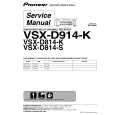
VSX-D814-K/KUXJICA PIONEER
Instrukcja Serwisowa

Kompletna instrukcja serwisowa w formie pliku PDF. Instrukcje serwisowe zazwyczaj zawierają schemat…
>
Parse Time: 1.073 - Number of Queries: 214 - Query Time: 0.682