ADP 81 PC ALU Ilość: 1
$4.99
» Pokaż Szczegóły
SA6185/97 Ilość: 1
$4.99
» Pokaż Szczegóły
SCCA1080 Ilość: 1
$4.99
» Pokaż Szczegóły
AKZ 481/IX Ilość: 1
$4.99
» Pokaż Szczegóły
ZC403-1 Ilość: 1
$4.99
» Pokaż Szczegóły
GKI 9001/A+ Ilość: 1
$4.99
» Pokaż Szczegóły
ET18HKXSW07 Ilość: 1
$4.99
» Pokaż Szczegóły
WV1660A+NFX Ilość: 1
$4.99
» Pokaż Szczegóły
5900RC Ilość: 1
$4.99
» Pokaż Szczegóły
AYXPM12FR Ilość: 1
$4.99
» Pokaż Szczegóły
KEHM4500SDK/EW/IT Ilość: 1
$4.99
» Pokaż Szczegóły
XR-C610 Ilość: 1
$4.99
» Pokaż Szczegóły
KT2651XMG2 Ilość: 1
$4.99
» Pokaż Szczegóły
VT-M578EM Ilość: 1
$4.99
» Pokaż Szczegóły
WRT18PKLJB00 Ilość: 1
$4.99
» Pokaż Szczegóły
HX7012/10 Ilość: 1
$4.99
» Pokaż Szczegóły
GSI 5919 WS Ilość: 1
$4.99
» Pokaż Szczegóły
KECC507RBL03 Ilość: 1
$4.99
» Pokaż Szczegóły
VR66602 Ilość: 1
$4.99
» Pokaż Szczegóły
RS-1058 Ilość: 1
$4.99
» Pokaż Szczegóły
SDK320H Ilość: 1
$4.99
» Pokaż Szczegóły
HB77L55/01 Ilość: 1
$4.99
» Pokaż Szczegóły
OFFICE 200 Ilość: 1
$4.99
» Pokaż Szczegóły
TH42PD25U Ilość: 1
$4.99
» Pokaż Szczegóły
EM 500 G3 Ilość: 1
$4.99
» Pokaż Szczegóły
NNS543BFR Ilość: 1
$4.99
» Pokaż Szczegóły
RQSX57EB Ilość: 1
$4.99
» Pokaż Szczegóły
EHD251CMWR0 Ilość: 1
$4.99
» Pokaż Szczegóły
XPR970AEZAK Ilość: 1
$4.99
» Pokaż Szczegóły
8TLSR7432LT1 Ilość: 1
$4.99
» Pokaż Szczegóły
SS7000AV Ilość: 1
$4.99
» Pokaż Szczegóły
REFLEXION FILTER Ilość: 1
$4.99
» Pokaż Szczegóły
ZI2160 Ilość: 1
$4.99
» Pokaż Szczegóły
DVR-640H-S/KUCXV Ilość: 1
$4.99
» Pokaż Szczegóły
NV-RZ10 Ilość: 1
$4.99
» Pokaż Szczegóły
HN1000IA Ilość: 1
$4.99
» Pokaż Szczegóły
KS-208HT Ilość: 1
$4.99
» Pokaż Szczegóły
DX-2800 Ilość: 1
$4.99
» Pokaż Szczegóły
LCX-337EZ Ilość: 1
$4.99
» Pokaż Szczegóły
K806RP/60F 2M BROWN Ilość: 1
$4.99
» Pokaż Szczegóły
BMZD 6200/WS Ilość: 1
$4.99
» Pokaż Szczegóły
KUDB03CTBL2 Ilość: 1
$4.99
» Pokaż Szczegóły
C28ER14 Ilość: 1
$4.99
» Pokaż Szczegóły
HR-S6970AG Ilość: 1
$4.99
» Pokaż Szczegóły
ART 686 IX Ilość: 1
$4.99
» Pokaż Szczegóły
SLV440PX Ilość: 1
$4.99
» Pokaż Szczegóły
VJ22 SERIES Ilość: 1
$4.99
» Pokaż Szczegóły
CAFECLASSIC101 Ilość: 1
$4.99
» Pokaż Szczegóły
ARMM450 Ilość: 1
$4.99
» Pokaż Szczegóły
LK01 Ilość: 1
$4.99
» Pokaż Szczegóły
RT-101HB Ilość: 1
$4.99
» Pokaż Szczegóły
SC8630EXB3 Ilość: 1
$4.99
» Pokaż Szczegóły
BVV5PS Ilość: 1
$4.99
» Pokaż Szczegóły
C8890GB Ilość: 1
$4.99
» Pokaż Szczegóły
DC11 Ilość: 1
$4.99
» Pokaż Szczegóły
CLOV 64/IX Ilość: 1
$4.99
» Pokaż Szczegóły
XB1000 Ilość: 1
$4.99
» Pokaż Szczegóły
72GF-66ECH Ilość: 1
$4.99
» Pokaż Szczegóły
33DV2 Ilość: 1
$4.99
» Pokaż Szczegóły
1769 E Ilość: 1
$4.99
» Pokaż Szczegóły
XPR210ALH/AU/AHC/A Ilość: 1
$4.99
» Pokaż Szczegóły
AFG 6352 AP/1 Ilość: 1
$4.99
» Pokaż Szczegóły
CL8082 Ilość: 1
$4.99
» Pokaż Szczegóły
14PV172/13 Ilość: 1
$4.99
» Pokaż Szczegóły
CXNS90 Ilość: 1
$4.99
» Pokaż Szczegóły
CT3308/BY1UA0HC Ilość: 1
$4.99
» Pokaż Szczegóły
3700S-DCHSDK Ilość: 1
$4.99
» Pokaż Szczegóły
S1C-S Ilość: 1
$4.99
» Pokaż Szczegóły
TF465A Ilość: 1
$4.99
» Pokaż Szczegóły
VSX-818V-S/MYSXJ5 Ilość: 1
$4.99
» Pokaż Szczegóły
CRG7500CAE Ilość: 1
$4.99
» Pokaż Szczegóły
LX9000R/22S Ilość: 1
$4.99
» Pokaż Szczegóły
CQ-C8100U Ilość: 1
$4.99
» Pokaż Szczegóły
ADG 8555/1 WH Ilość: 1
$4.99
» Pokaż Szczegóły
MARINE6902M Ilość: 1
$4.99
» Pokaż Szczegóły
NSXA30 Ilość: 1
$4.99
» Pokaż Szczegóły
LCD1.20EAA Ilość: 1
$4.99
» Pokaż Szczegóły
JEB5670B-CH Ilość: 1
$4.99
» Pokaż Szczegóły
KVXR29M83 Ilość: 1
$4.99
» Pokaż Szczegóły
KV29FX65K Ilość: 1
$4.99
» Pokaż Szczegóły
KA-896 Ilość: 1
$4.99
» Pokaż Szczegóły
RUD1000KB3 Ilość: 1
$4.99
» Pokaż Szczegóły
SD6371T Ilość: 1
$4.99
» Pokaż Szczegóły
15PT2301/74R Ilość: 1
$4.99
» Pokaż Szczegóły
DU8500XT1 Ilość: 1
$4.99
» Pokaż Szczegóły
AOCD2770E Ilość: 1
$4.99
» Pokaż Szczegóły
ZFL1023 Ilość: 1
$4.99
» Pokaż Szczegóły
TX-Z9400M Ilość: 1
$4.99
» Pokaż Szczegóły
Lavamat Princess 800E Ilość: 1
$4.99
» Pokaż Szczegóły
32PW962B Ilość: 1
$4.99
» Pokaż Szczegóły
ZR300 Ilość: 1
$4.99
» Pokaż Szczegóły
107E66/75 Ilość: 1
$4.99
» Pokaż Szczegóły
FW18 Ilość: 1
$4.99
» Pokaż Szczegóły
QR90I Ilość: 1
$4.99
» Pokaż Szczegóły
KV38FV26T Ilość: 1
$4.99
» Pokaż Szczegóły
W sumie: $474.05
 
English Polski Spanish 
Szukaj instrukcji do
 

(e.g. AA-V20EG JVC, ZX-7 Sony )
PayPal 1000+ rating Secure, Encrypted Checkout.
 
Kategorie
Informacje
Polecamy
Strona główna >> SONY >> AVDC700ES Instrukcja Obsługi
 
 95 szt. w koszyku 

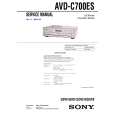
SONY AVDC700ES
Instrukcja Obsługi


Tweetnij o tym produkcie a dostaniesz $1.00 rabatu!
  • Plik do pobrania
  • Format PDF
  • Kompletna instrukcja
  • Język: English, French
Cena: $4.99

Opis SONY AVDC700ES Instrukcja Obsługi

Kompletna instrukcja obsługi w formie pliku PDF. Plik PDF zostanie dostarczony na Twój adres email po jego zakupieniu.

Instrukcje obsługi (czasami nazywane także podręcznikiem użytkownika) opisuja funkcje i sposób działania danego produktu.

Instrukcja jest dostępna w następujących językach: English, French

Plik nie jest jeszcze gotowy
Musisz najpierw dokonać zakupu.

Recenzje produktu
Dla tego produktu nie napisano jeszcze recenzji!

Tekstowy podgląd strony 20 (kliknij aby zobaczyć)
AVD-C700ES SECTION 4 TEST MODE
[Transfer Mode] 1. Press the [POWER] button to turn the set on. 2. Press the buttons of x and [DISC4] simulaneously for five
3. 4. seconds. The message �MECHA LOCK� displayed. To exit from this mode, press the [POWER] button to turn the set off. 9. Press the > button and the message �1H2L3-4-5� is displayed and DISC1 LED turn on, DISC2 LED turn on dark and DISC 3 to 5 LEDs turn off. Press the > button and the message �1-2H3L4-5-� is displayed and DISC1 LED turn on dark, DISC2 LED turn on and DISC3 LED turn on dark, DISC4 or 5 LEDs turn off. Press the > button and the message �1-2-3H4L5-� is displayed and DISC1 or 2 LEDs turn on dark, DISC3 LED turn on and DISC4 LED turn on dark, DISC5 LED turn off. Press the > button and the message �1-2-3-4H5L� is displayed and DISC1 to 3 LEDs turn off, DISC4 LED turn on and DISC5 LED turn on dark. Press the > button and the message �LED OFF� is displayed and all LEDs turn off. Press the > button. All segments turn on and all LEDs turn on just the same as 3. By pressing the . button and the message �AVD-C700ES� is displayed. Press the . button and the message �Dest <000>� is displayed. Press the . button and the message �STRµ #,##� is displayed. Press the . button and the message �DVDµ #,##� is displayed. To exit from this mode, press the [POWER] button to turn the set off.

10.

11.

[Jog Volume Mode]
* Master Volume Check. Procedure: 1. Press the [POWER] button to turn the set on. 2. To enter the test mode, press the three buttons X , [A.F.D] and Z simultaneously. 3. The message �JOG 0� is displayed. 4. �JOG 0� value increases like +1, +2, +3 ... if rotating the [VOLUME] knob clockwise, or it decreases like -1, -2, -3, ... if rotating counter-clockwise. 5. To exit from this mode, press the [POWER] button to turn the set off. 12.

13. 14. 15. 16. 17.

[Key Check Mode]
* Keyboard check. Procedure: 1. Press the [POWER] button to turn the set on. 2. 3. To enter the test mode, press three buttons X , [PRESET �] and Z simultaneously. In the key check mode, the fluorecent indicator displays �KEYNUM 0�. Each time a button (without the [POWER] button) is pressed, �KEYNUM 0� value increases. However, once a button is pressed, it is no longer taken into account. To exit from this mode, press the [POWER] button to turn the set off. 18. 19.

[Disc Tray Lock]
The disc tray lock function for the antitheft of an demonstration disc in the store is equipped. Setting Procedure: 1. Press the [POWER] button to turn the set on. 2. Press two buttons of x and Z simultaneously for five seconds. 3. The message �LOCKED� is displayed and the tray is locked. Releasing Procedure: 1. Press two buttons of x and Z simultaneously for five seconds again. 2. The message �UNLOCKED� is displayed and the tray is unlocked.
Note: When �LOCKED� is displayed, the tray lock is not released by turning power on/off with the [POWER] button.

4.

[Display Test Mode and Version Display Mode]
* Fluorescent segments and LEDs are tested when this test is activated. Procedure: 1. 2. 3. Press the [POWER] button to turn the set on. To enter the test mode, press the three buttons X , [DISPLAY] and Z simultaneously. All segments turn on and all LEDs turn on. ( MULTI CHANNEL DECODING LED (blue), [DISC 1 to 5] LEDs (blue)) Press the > button and confirm the display and all LEDs turn on. Press the > button and confirm the display and all LEDs turn off. Press the > button and confirm all segments and all LEDs turn off. Press the > button and the message �MCD_LED ON� is displayed and �MULTI CHANNEL DECODING� LED turn on. Press the > button and the message �1L2L3L4L5L� is displayed and DISC 1 to 5 LED turn on dark.

[SHIPMENT Mode]
* The All Clear clears all data including preset data stored in the RAM to initial conditions. Execute this mode when returning the set to the customer. Procedure: 1. Press the [POWER] button to turn the set on. 2. To enter the test mode, press the three buttons [MODE], [PRESET+] and Z simultaneously. 3. The LCD displays the message �SHIP MODE�. 4. Press the G button. 5. The LCD displays the message �FINISHED!� and the set is reset. 6. To exit from this mode, press the [POWER] button to turn the set off.

4. 5. 6. 7.

8.

20

Klienci kupując ten produkt kupili także

$4.99

AVDC700ES SONY
Instrukcja Serwisowa

Kompletna instrukcja serwisowa w formie pliku PDF. Instrukcje serwisowe zazwyczaj zawierają schemat…
>
Parse Time: 2.075 - Number of Queries: 441 - Query Time: 1.495