RT310H/S Ilość: 1
$4.99
» Pokaż Szczegóły
F901CHASSIS Ilość: 1
$4.99
» Pokaż Szczegóły
AWM 8143-AUSTR. Ilość: 1
$4.99
» Pokaż Szczegóły
B2 Ilość: 1
$4.99
» Pokaż Szczegóły
P.CZ.MOD. Ilość: 1
$4.99
» Pokaż Szczegóły
ARZ 730/B Ilość: 1
$4.99
» Pokaż Szczegóły
Z1175GB Ilość: 1
$4.99
» Pokaż Szczegóły
14PV422/01 Ilość: 1
$4.99
» Pokaż Szczegóły
NNS669BAS Ilość: 1
$4.99
» Pokaż Szczegóły
WCF 11 Ilość: 1
$4.99
» Pokaż Szczegóły
GSI 5890 TW-SW Ilość: 1
$4.99
» Pokaż Szczegóły
NVS-HB04 Ilość: 1
$4.99
» Pokaż Szczegóły
MH1170XSQ2 Ilość: 1
$4.99
» Pokaż Szczegóły
KSRB25FKSS00 Ilość: 1
$4.99
» Pokaż Szczegóły
CUVA75KE/ Ilość: 1
$4.99
» Pokaż Szczegóły
431 V11 Ilość: 1
$4.99
» Pokaż Szczegóły
KXTS85GW Ilość: 1
$4.99
» Pokaż Szczegóły
KV-32S10 Ilość: 1
$4.99
» Pokaż Szczegóły
PRESTIGE 2480 Ilość: 1
$4.99
» Pokaż Szczegóły
AZ6834/17 Ilość: 1
$4.99
» Pokaż Szczegóły
KGA 355 OPTIMA WS Ilość: 1
$4.99
» Pokaż Szczegóły
KSRK25ILSS01 Ilość: 1
$4.99
» Pokaż Szczegóły
ESI6230W Ilość: 1
$4.99
» Pokaż Szczegóły
EA0600 Ilość: 1
$4.99
» Pokaż Szczegóły
AWT 2281 Ilość: 1
$4.99
» Pokaż Szczegóły
AE6360/00S Ilość: 1
$4.99
» Pokaż Szczegóły
MC-DV250 Ilość: 1
$4.99
» Pokaż Szczegóły
SD41240I Ilość: 1
$4.99
» Pokaż Szczegóły
DV1506 Ilość: 1
$4.99
» Pokaż Szczegóły
AWZ 3427 W Ilość: 1
$4.99
» Pokaż Szczegóły
FT1931C Ilość: 1
$4.99
» Pokaż Szczegóły
W sumie: $154.69
 
English Polski Spanish 
Szukaj instrukcji do
 

(e.g. AA-V20EG JVC, ZX-7 Sony )
PayPal 1000+ rating Secure, Encrypted Checkout.
 
Kategorie
Informacje
Polecamy
Strona główna >> SONY >> CAVM1000ES Instrukcja Obsługi
 
 31 szt. w koszyku 

SONY CAVM1000ES
Instrukcja Obsługi


Tweetnij o tym produkcie a dostaniesz $1.00 rabatu!
  • Plik do pobrania
  • Format PDF
  • Kompletna instrukcja
  • Język: English
Cena: $4.99

Opis SONY CAVM1000ES Instrukcja Obsługi

Kompletna instrukcja obsługi w formie pliku PDF. Plik PDF zostanie dostarczony na Twój adres email po jego zakupieniu.

Instrukcje obsługi (czasami nazywane także podręcznikiem użytkownika) opisuja funkcje i sposób działania danego produktu.

Instrukcja jest dostępna w następujących językach: English

Plik nie jest jeszcze gotowy
Musisz najpierw dokonać zakupu.

Recenzje produktu
Dla tego produktu nie napisano jeszcze recenzji!

Tekstowy podgląd strony 24 (kliknij aby zobaczyć)
Customizing the Main Unit � INSTALLATION Mode

Adjusting the source input offset � SOURCE INPUT OFFSET
You can keep the volume balance among source components by taking an average of the output level from each source component.

Locking the settings � SETUP LOCK
You can lock in the settings under which have been entered into the Main Unit.

1 2

Turn off the power. Press and hold SOURCE SELECT + and BACK simultaneously, and then turn on the power. �SETUP LOCK� appears for a few seconds, then the display window displays the SETUP LOCK window. Press the R cursor or r cursor to turn SETUP LOCK on or off. The display window changes as follows: SETUP LOCK r LOCK [OFF] LOCK [ON]
Rr Rr

1 2

Turn off the power. Press and hold ZONE + and ALL ZONE MUTING simultaneously, and then turn on the power. �SOURCE OFFSET� appears in the display window for a few seconds. Press the R cursor or r cursor repeatedly to select a source number. Each time you press the R cursor or r cursor, the display window changes cyclically as shown below. SOURCE OFFSET (Appears for a few seconds)
r

�

Setting up the Main Unit

3

3

(Appears for a few seconds)

t SOURCE 1
Y

Rr Rr Rr

4

Press ENTER when you have finished. The display window returns to the NORMAL mode.
Notes
� The following are the preferences that can be locked in in the SETUP LOCK mode. All settings in the LEARN mode. All settings in the SETUP mode. Settings for the Disc Search. The adjustment of SOURCE OFFSET. All Clear. � When you select settings that cannot be changed, �LOCKED!� appears for a few seconds, then the display window returns to the NORMAL mode.

SOURCE 2 t SOURCE 8

4 5

Press ENTER. The display window displays the OFFSET settings. Press the R cursor or r cursor to adjust the offset. Each time you press the R cursor or r cursor, the display window changes cyclically as shown below.

t OFFSET 0dB OFFSET -1dB OFFSET -2dB OFFSET -3dB OFFSET -4dB t OFFSET -5dB

Rr Rr Rr Rr Rr Rr

6

Press ENTER when you want to adjust the offset for other source components. The step goes back to step 3. Press CANCEL when you have finished. The display window returns to the NORMAL mode.
Note
In a zone where SOURCE INPUT OFFSET is ON, the actual volume level is lower than the displayed volume level.

7

24US

Klienci kupując ten produkt kupili także

$4.99

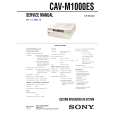
CAVM1000ES SONY
Instrukcja Serwisowa

Kompletna instrukcja serwisowa w formie pliku PDF. Instrukcje serwisowe zazwyczaj zawierają schemat…
>
Parse Time: 0.803 - Number of Queries: 214 - Query Time: 0.441