DVR-S806/KBXV Ilość: 1
$4.99
» Pokaż Szczegóły
SPKPC3 Ilość: 1
$4.99
» Pokaż Szczegóły
XR-4412 Ilość: 1
$4.99
» Pokaż Szczegóły
MX-GB5 Ilość: 1
$4.99
» Pokaż Szczegóły
20 TEAM Ilość: 1
$4.99
» Pokaż Szczegóły
SA1105/58 Ilość: 1
$4.99
» Pokaż Szczegóły
RUD3006DB1 Ilość: 1
$4.99
» Pokaż Szczegóły
CTV160P/S Ilość: 1
$4.99
» Pokaż Szczegóły
RS22AQXMQ01 Ilość: 1
$4.99
» Pokaż Szczegóły
CS2215 Ilość: 1
$4.99
» Pokaż Szczegóły
FM737 Ilość: 1
$4.99
» Pokaż Szczegóły
KECG260SOB3 Ilość: 1
$4.99
» Pokaż Szczegóły
DMC-LS80GN VOLUME 1 Ilość: 1
$4.99
» Pokaż Szczegóły
DAVDX250 Ilość: 1
$4.99
» Pokaż Szczegóły
DDBI 5790 IN Ilość: 1
$4.99
» Pokaż Szczegóły
LPR 826/01 Ilość: 1
$4.99
» Pokaż Szczegóły
SKALD 2 RP630 Ilość: 1
$4.99
» Pokaż Szczegóły
CAH-408 Ilość: 1
$4.99
» Pokaż Szczegóły
HTP105-SW Ilość: 1
$4.99
» Pokaż Szczegóły
DTD1447 Ilość: 1
$4.99
» Pokaż Szczegóły
RSM215 Ilość: 1
$4.99
» Pokaż Szczegóły
ET22DMXVM01 Ilość: 1
$4.99
» Pokaż Szczegóły
GI1500XHT2 Ilość: 1
$4.99
» Pokaż Szczegóły
HSTD305 Ilość: 1
$4.99
» Pokaż Szczegóły
S-DV434SW/XCN5 Ilość: 1
$4.99
» Pokaż Szczegóły
KVG21M2 Ilość: 1
$4.99
» Pokaż Szczegóły
SLS240P/PC Ilość: 1
$4.99
» Pokaż Szczegóły
AMW 462/1 IX Ilość: 1
$4.99
» Pokaż Szczegóły
WA 4560/WS-B Ilość: 1
$4.99
» Pokaż Szczegóły
RAB2121JW0 Ilość: 1
$4.99
» Pokaż Szczegóły
8801KT Ilość: 1
$4.99
» Pokaż Szczegóły
ARC 1865 Ilość: 1
$4.99
» Pokaż Szczegóły
DCRTRV730 Ilość: 1
$4.99
» Pokaż Szczegóły
KTRC22KBAL00 Ilość: 1
$4.99
» Pokaż Szczegóły
ADG 4550/1 WH Ilość: 1
$4.99
» Pokaż Szczegóły
GEX-P10XMT/XN/UC Ilość: 1
$4.99
» Pokaż Szczegóły
W1106 Ilość: 1
$4.99
» Pokaż Szczegóły
GRAX58S Ilość: 1
$4.99
» Pokaż Szczegóły
DVDR61533 Ilość: 1
$4.99
» Pokaż Szczegóły
HSPS162 YUY1YHYJ Ilość: 1
$4.99
» Pokaż Szczegóły
KXTCA255CE Ilość: 1
$4.99
» Pokaż Szczegóły
DEH435 Ilość: 1
$4.99
» Pokaż Szczegóły
KAWE560WAL0 Ilość: 1
$4.99
» Pokaż Szczegóły
ARM09NPS8A1 Ilość: 1
$4.99
» Pokaż Szczegóły
W sumie: $219.56
 
English Polski Spanish 
Szukaj instrukcji do
 

(e.g. AA-V20EG JVC, ZX-7 Sony )
PayPal 1000+ rating Secure, Encrypted Checkout.
 
Kategorie
Informacje
Polecamy
Strona główna >> JVC >> HR-J270EK Instrukcja Obsługi
 
 44 szt. w koszyku 

JVC HR-J270EK
Instrukcja Obsługi


Tweetnij o tym produkcie a dostaniesz $1.00 rabatu!
  • Plik do pobrania
  • Format PDF
  • Kompletna instrukcja
  • Język: English
Cena: $4.99

Opis JVC HR-J270EK Instrukcja Obsługi

Kompletna instrukcja obsługi w formie pliku PDF. Plik PDF zostanie dostarczony na Twój adres email po jego zakupieniu.

Instrukcje obsługi (czasami nazywane także podręcznikiem użytkownika) opisuja funkcje i sposób działania danego produktu.

Instrukcja jest dostępna w następujących językach: English

Plik nie jest jeszcze gotowy
Musisz najpierw dokonać zakupu.

Recenzje produktu
Dla tego produktu nie napisano jeszcze recenzji!

Tekstowy podgląd strony 15 (kliknij aby zobaczyć)
15
Record One Programme While Watching Another

SELECT PRESET TO WATCH

1

PR+/�

Once recording is in progress, all you need to do is to set the preset controls on the TV for the station you wish to view.

�

�

� The programme selected with the TV�s preset controls appears on the TV screen while the one selected with the recorder's PR buttons is recorded on the tape.
R EC O R D

Elapsed Recording Time Indication
You can check the exact time of a recording.

� �:� �

: � �

� �:� �

SET COUNTER DISPLAY

1 4 7
0000

2 5 8 0

3
2

1
4

Press � �:� � until a counter reading appears on the display panel.

6 9

RESET COUNTER
Press 0000 before starting recording or playback.

2
PR

� The counter is reset to �0:00:00� and shows the exact elapsed time as the tape runs.

1

?

Instant Timer Recording (ITR)
This easy method allows you to record for any length of time from 30 mins. to 6 hours (selectable in 30-min. increments), and shuts off the recorder after recording is finished.
3

START RECORDING

Tape Remaining Time

1 2 3

Press RECORD on the recorder.

ENGAGE ITR MODE
Press RECORD again. " the front display panel. " blinks and 0:30 appears on

1

DISPLAY REMAINING TIME
Press � �:� � until the time remaining on the tape appears. � The display panel shows the tape remaining time with " " displayed. � By pressing the � �:� � button, you can change the display to show the counter reading, preset position*, clock time or tape remaining time.
* Preset position is not displayed during playback.

SET RECORDING DURATION
If you want to record for more than 30 minutes, press RECORD to extend the time. Each press extends recording time by 30 minutes.

NOTE:
You can only perform ITR using the RECORD button on the recorder's front panel.

NOTE:
Depending on the type of tape used, there may be times when the tape remaining time reading may not appear right away, or is not correct. "� �:� �" may sometimes appear, or the display may blink on occasion.

Klienci kupując ten produkt kupili także

$4.99

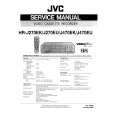
HRJ270EK JVC
Instrukcja Serwisowa

Kompletna instrukcja serwisowa w formie pliku PDF. Instrukcje serwisowe zazwyczaj zawierają schemat…
>
Parse Time: 0.871 - Number of Queries: 253 - Query Time: 0.509