RTF800 Ilość: 1
$4.99
» Pokaż Szczegóły
EHY860X Ilość: 1
$4.99
» Pokaż Szczegóły
B88315-4-A Ilość: 1
$4.99
» Pokaż Szczegóły
CFSDW80 Ilość: 1
$4.99
» Pokaż Szczegóły
ART 479/R Ilość: 1
$4.99
» Pokaż Szczegóły
AR1200XW3 Ilość: 1
$4.99
» Pokaż Szczegóły
SB-28DX Ilość: 1
$4.99
» Pokaż Szczegóły
MDP-U3 Ilość: 1
$4.99
» Pokaż Szczegóły
VGN-SZ1HRP/B VAIO Ilość: 1
$4.99
» Pokaż Szczegóły
37H2 Ilość: 1
$4.99
» Pokaż Szczegóły
SDP-2D Ilość: 1
$4.99
» Pokaż Szczegóły
KGRT500FAL2 Ilość: 1
$4.99
» Pokaż Szczegóły
SDE-2500 Ilość: 1
$4.99
» Pokaż Szczegóły
SLV-E800VC Ilość: 1
$4.99
» Pokaż Szczegóły
CTL1502AEW Ilość: 1
$4.99
» Pokaż Szczegóły
PDP503MX Ilość: 1
$4.99
» Pokaż Szczegóły
ASE 053 Ilość: 1
$4.99
» Pokaż Szczegóły
RB160PXBB2 Ilość: 1
$4.99
» Pokaż Szczegóły
RB170PXBQ2 Ilość: 1
$4.99
» Pokaż Szczegóły
EOC6697U NORDIC R05 Ilość: 1
$4.99
» Pokaż Szczegóły
TR1355A Ilość: 1
$4.99
» Pokaż Szczegóły
METAL MASTER Ilość: 1
$4.99
» Pokaż Szczegóły
FLS622C Ilość: 1
$4.99
» Pokaż Szczegóły
AKZ195/AV Ilość: 1
$4.99
» Pokaż Szczegóły
KGCP463KSS01 Ilość: 1
$4.99
» Pokaż Szczegóły
ARC 1720 Ilość: 1
$4.99
» Pokaż Szczegóły
PD37ST Ilość: 1
$4.99
» Pokaż Szczegóły
C10 Ilość: 1
$4.99
» Pokaż Szczegóły
SV-651F Ilość: 1
$4.99
» Pokaż Szczegóły
KSRS22QXWH00 Ilość: 1
$4.99
» Pokaż Szczegóły
GR-D290UB Ilość: 1
$4.99
» Pokaż Szczegóły
ED25DQXDB02 Ilość: 1
$4.99
» Pokaż Szczegóły
DEHP2050 Ilość: 1
$4.99
» Pokaż Szczegóły
ESI4112W Ilość: 1
$4.99
» Pokaż Szczegóły
7MWT97900SM0 Ilość: 1
$4.99
» Pokaż Szczegóły
CSIG501SVN Ilość: 1
$4.99
» Pokaż Szczegóły
ED2JHGXRB01 Ilość: 1
$4.99
» Pokaż Szczegóły
DA5190W Ilość: 1
$4.99
» Pokaż Szczegóły
CT5599 Ilość: 1
$4.99
» Pokaż Szczegóły
F88080IA Ilość: 1
$4.99
» Pokaż Szczegóły
TU5371/BE029P Ilość: 1
$4.99
» Pokaż Szczegóły
EGZT 3400/02 IN Ilość: 1
$4.99
» Pokaż Szczegóły
KD2J Ilość: 1
$4.99
» Pokaż Szczegóły
KGYW777BWH2 Ilość: 1
$4.99
» Pokaż Szczegóły
LEQ8857JT1 Ilość: 1
$4.99
» Pokaż Szczegóły
WD101305F Ilość: 1
$4.99
» Pokaż Szczegóły
WACARE 24 DI Ilość: 1
$4.99
» Pokaż Szczegóły
NV-GS500EE Ilość: 1
$4.99
» Pokaż Szczegóły
AFG 346 AP Ilość: 1
$4.99
» Pokaż Szczegóły
DM-DV5/XCN1/EW5 Ilość: 1
$4.99
» Pokaż Szczegóły
5580 Ilość: 1
$4.99
» Pokaż Szczegóły
X-EV51D/DDXJ/RA Ilość: 1
$4.99
» Pokaż Szczegóły
M.S.M.-1 Ilość: 1
$4.99
» Pokaż Szczegóły
ED25TEXHW02 Ilość: 1
$4.99
» Pokaż Szczegóły
W sumie: $269.46
 
English Polski Spanish 
Szukaj instrukcji do
 

(e.g. AA-V20EG JVC, ZX-7 Sony )
PayPal 1000+ rating Secure, Encrypted Checkout.
 
Kategorie
Informacje
Polecamy
Strona główna >> SONY >> RCDW3 Instrukcja Obsługi
 
 54 szt. w koszyku 

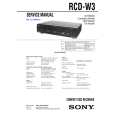
SONY RCDW3
Instrukcja Obsługi


Tweetnij o tym produkcie a dostaniesz $1.00 rabatu!
  • Plik do pobrania
  • Format PDF
  • Kompletna instrukcja
  • Język: English
Cena: $4.99

Opis SONY RCDW3 Instrukcja Obsługi

Kompletna instrukcja obsługi w formie pliku PDF. Plik PDF zostanie dostarczony na Twój adres email po jego zakupieniu.

Instrukcje obsługi (czasami nazywane także podręcznikiem użytkownika) opisuja funkcje i sposób działania danego produktu.

Instrukcja jest dostępna w następujących językach: English

Plik nie jest jeszcze gotowy
Musisz najpierw dokonać zakupu.

Recenzje produktu
Dla tego produktu nie napisano jeszcze recenzji!

Tekstowy podgląd strony 21 (kliknij aby zobaczyć)
Erasing a single track of CD-RW disc
You can erase one track on a CD-RW at a time. This process starts with the last track on the disc. Please note that before erasing a track, you must unfinalize the disc. If the disc is not unfinalized, follow the instructions of �Unfinalizing a CD-RW disc� (page 20). When using the remote, set SELECT to CDR for operations on DECK B.

Erasing an Entire CD-RW disc
Erasing the entire contents of a CD-RW disc is easy, and it does not matter whether the disc has been unfinalized or not. When using the remote, set SELECT to CDR for operations on DECK B.

ERASE

ERASE

1 Press ERASE twice until �DISC ERASE�
appears in the front panel display.

1 Press the ERASE button.
The �LAST TR ERASE� indicator will begin to flash, and the PLAY, PAUSE, and REC indicators light up for about 8 seconds. Erasing enters in standby mode.

The �DISC ERASE� indicator will begin to flash, and the PLAY, PAUSE, and REC indicators light up for about 8 seconds. Entire disc erasing enters in the standby mode.

2 Press H while �LAST TR ERASE� is
flashing.

2 Press H while �DISC ERASE� is
flashing.

The last track erasing starts. During the last track erasing, �LAST ERASE� appears in the display. When this process is finished, the total track number and the total playing time appears in the display.
Notes

Entire disc erasing starts. During erasing, �DISC ERASE� appears in the front panel display. When this process is finished, �00.00� appears in the display.
Notes

� Once entire disc erasing process starts, you cannot stop the erasing in the middle of the process. � Do not turn off the recorder or disconnect the recorder from the power source in the middle of the erasing process.

� The TOC (red) indicator appears on the front panel display if the disc you put in the DECK B has not been finalized. Check the indicator each time before erasing the last track of a disc. � Once erasing process starts, you cannot stop in the middle of the process. � Do not turn off the recorder or disconnect the recorder from the power source in the middle of the erasing process.

Recording on CDR

21

Klienci kupując ten produkt kupili także

$4.99

RCDW3 SONY
Instrukcja Serwisowa

Kompletna instrukcja serwisowa w formie pliku PDF. Instrukcje serwisowe zazwyczaj zawierają schemat…
>
Parse Time: 1.129 - Number of Queries: 299 - Query Time: 0.689